Song library
Search by title, author, tag, or lyric. Edit sections and reuse layouts without rebuilding a service.
 G-Presenter
G-Presenter puts songs, Scripture, media, and multi-screen control in one focused desktop app. Everything stays on your computer, so Sunday morning does not depend on a cloud connection.
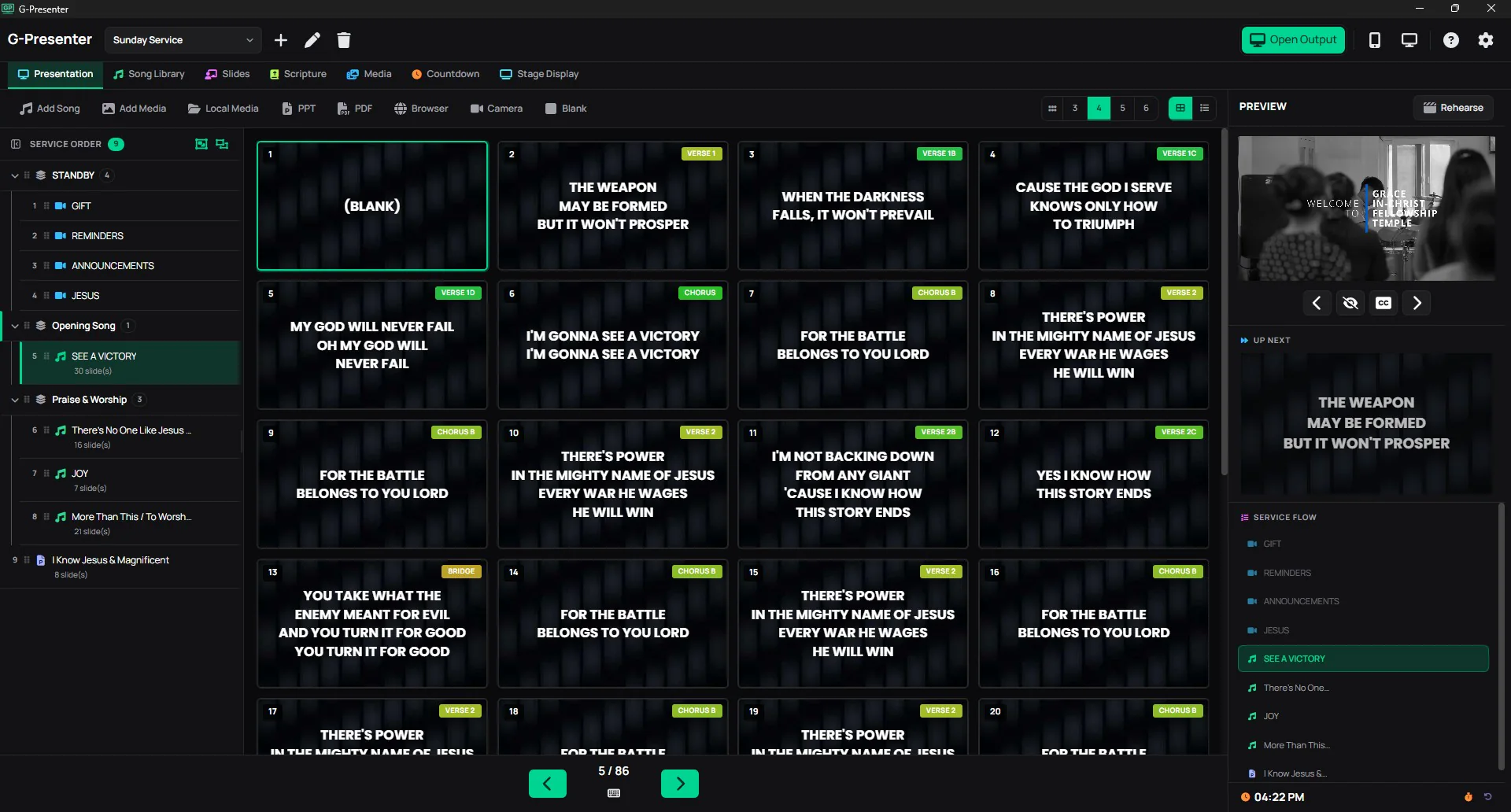
Everything you need is organized around the way a live service actually moves.
Search by title, author, tag, or lyric. Edit sections and reuse layouts without rebuilding a service.
KJV, ASV, and Tagalog are bundled. Import translations in Zefania XML and compare versions side by side.
Mix songs, decks, images, video, Browser, Camera, PPT, and PDF items into one calm service order.
Control the service from a phone and give performers a live next-slide view over your local network.
Here is the complete feature catalog, including the smaller details that make a live service easier to run.
Add, edit, and organize all your worship songs in one place. Tag them, label each section (verse, chorus, bridge), and find any song in seconds. Forgot the title? Search by lyrics and the library finds it instantly. Reorder slides for each service without changing the original.
Save reusable song styles for lyrics, fonts, backgrounds, colors, shadows, spacing, and layout. Start new songs from a blank template or a church-ready preset so every service keeps a consistent look.
Build your entire service lineup with songs, custom slide decks, Browser slides, Camera feeds, PPT, PDF files, and blank screens in the order you need them. Import .pptx, .ppt, and .pdf files directly. Build decks with background and foreground image overlays, drop in multiple images at once as a one-per-slide photo slideshow, and set any slide to auto-advance after a set number of seconds. Clicking a song previews it first so you can review before sending to the projector.
Comes with three Bible translations already installed: KJV, ASV, and Tagalog. Display any verse on screen in seconds, and switch between translations without losing your place. Compare two or three versions side by side or stacked on the projector. Add multiple verses as one compact group in the service order while still outputting one verse per slide.
Add a website or vdo.ninja camera feed directly to the service order as a Browser item. It previews and outputs at the same aspect ratio as your projector, supports audio with a mute/unmute toggle, and can also be used as a live background behind lyrics.
Add webcams, USB cameras, or capture devices as a Pro-gated service-order item. Use the camera as a live slide, reuse it behind Song lyrics, or place it behind a Countdown. Camera video fills the frame without stretching, and audio starts muted unless the operator enables it.
Upload images and videos as slide backgrounds, or use local files directly from your computer. Square images are automatically displayed at their original size to prevent cropping. Switching between media is instant.
Play background music or special tracks during the service from a floating, draggable player. Attach one or more MP3 files, build a playlist with previous/next, seek, loop, and shuffle, and collapse it out of the way when you don't need it.
Show a countdown on the main projector, on extra displays, or everywhere at once with the Show On selector. Switch to Current Time mode for a live clock, or let the timer run past zero into red overtime. Use local image or video files as the background with a mute/unmute toggle. The timer also mirrors onto the stage display so performers know exactly how much time is left.
Adjust fonts, text size, bold, italic, uppercase, letter spacing, line height, text shadow, outlines, and per-line text backgrounds on the fly. Supports system fonts including Telugu, Tamil, Devanagari, Arabic, and more. Changes show up on the projector, remote preview, and all connected displays right away.
Customize the app accent color, icon color, and interface theme from Settings. Active states, hover states, tabs, filters, and controls follow the same theme so the operator view feels consistent across the whole app.
Practice and preview your slides before going live. Nothing shows on the projector or connected screens until you're ready. Great for last-minute run-throughs.
Back up individual modules (songs, presentations, media) or create a full backup of everything at once. Restore on another computer and the app catches duplicates so you never end up with double entries.
Screen wake lock keeps the projector from sleeping during service. Lyrics toggle lets you hide or show text with a smooth fade without blanking the background. Both work automatically with no setup.
Control the presentation from a phone or tablet over Wi-Fi. Tap any lyrics or grouped Scripture card to jump to that slide, search Bible verses by reference or by content, preview before sending, and navigate the full service flow. Bottom controls are designed to stay usable on tablets and older iOS Safari devices.
Switch between 16:9 and 4:3 to match any projector. The change applies everywhere at once: operator preview, remote control, and all connected displays.
A dedicated view for performers on stage. Shows current lyrics with a next slide preview, grouped Scripture, custom messages from the operator (like "Next Song" or "Prayer Time"), private presenter notes, and a live countdown. Preview the exact stage layout in the operator panel, then send it wirelessly to phones and tablets or straight to a wired second or third monitor over HDMI.
Use the transparent overlay URL for lyrics, Scripture, and optional countdowns in OBS, vMix, and other production software with browser inputs. Existing OBS links still work, while newer compatibility support helps older embedded browsers load cleanly.
14 languages built in: English, Spanish, Italian, Portuguese, Tagalog, Korean, French, Chinese, Hindi, Arabic, Indonesian, Tamil, Russian, and Ukrainian. Switch instantly from Settings. Scripture formatting supports system fonts for any script including Telugu, Tamil, Devanagari, Bengali, Thai, and more.
Play, pause, stop, loop, and mute/unmute video backgrounds directly from the operator panel. Controls sync across the preview and output simultaneously. Service order videos sync playback time when going live so audio and video always match.
Place your church logo or a watermark in any corner of the audience output, with adjustable size and opacity. Optionally show it on the stage display too. Set it once and it stays in place across every slide.
Every screen is designed to be fast and easy to use when it matters most. Switch slides, find songs, and pull up verses without missing a beat during a live service.
Keep the operator view calm and the congregation focused with a workflow built around rehearsal.
Arrange songs, Scripture, decks, and media into the order you need.
Preview every slide and make last-minute edits without going live.
Send to the projector, stage, phone remote, or broadcast overlay.
There is no account to create, no cloud library to maintain, and no recurring bill to remember. Install it, import your songs, and keep serving even when the venue Wi-Fi is having a day.
See simple pricingMost worship software was designed for large churches with dedicated IT teams and annual budgets for software licenses.
G-Presenter was built for the rest of us.
Songs, Bibles, media, and settings are all stored on your own computer. Nothing is uploaded to the cloud. Your content is always available, always private, and always under your control.
No monthly fees. No yearly renewals. No "your subscription expired" surprises on a Sunday morning. You buy a license once and it works for the lifetime of that computer. Free updates for all v1.x releases included. And the free version has no watermarks or branding on your slides, ever.
With Pro, open a browser on any phone or tablet connected to the same Wi-Fi and you have a full remote control. No app to install, no account to create, no pairing process. Scan the QR code and you are in.
Pro users can connect up to 3 extra screens and 2 remote controls over the local network. No video splitters, no HDMI extenders, no special cables. If the device has a browser and Wi-Fi, it can show your slides.
Three translations come pre-installed with no download needed. Pro users can import hundreds of free Zefania XML translations in any language. Try doing that offline with most other tools.
In most small churches, the person running the slides is a volunteer who does this once a week. G-Presenter keeps the interface clean and straightforward so anyone can pick it up without training.
G-Presenter started because our small local church needed a presentation tool and we could not afford the ones available. The paid options were either too expensive for a church our size or required a monthly subscription we could not sustain. There are free alternatives out there, and some of them are genuinely capable, but the ones we tried were either difficult for our volunteers to learn quickly or had interfaces that slowed us down during a live service. We needed something that a first-time operator could pick up on a Sunday morning without a tutorial.
So I built one. I am a software developer who serves in our church media team, and I developed G-Presenter to solve the specific problems we kept running into: needing to pull up a Bible verse on the spot during a spontaneous altar call, wanting to control slides from the sound booth without walking back to the computer, and syncing the output to multiple screens around the venue without buying extra hardware. The interface had to be simple enough that any volunteer could sit down and run the entire service without training.
This is not a corporate product built by a team that has never run a Sunday service. It is a tool made by someone who sits where you sit, behind the laptop during worship, trying to make sure the right lyrics show up at the right time.
When you support G-Presenter by purchasing a Pro license, you are doing two things. First, you are helping me keep improving the software, fixing bugs, and adding the features that churches like ours actually need. Second, you are directly supporting our local church media team, because this project funds the equipment and resources we use every week.
If your church is in the same situation ours was, I hope G-Presenter helps. And if the free version is all you need, that is completely fine too. Use it as long as you want. No guilt and no nag screens.
Rommel Cuneta
Developer, G-Presenter
Real feedback shared by G-Presenter users on Facebook.
A quick look at the newest update, so you can check it before downloading.
This section shows the newest release title and notes at a glance.
Quick answers about preparing and running a service with G-Presenter.
Yes. G-Presenter is local-first. Your songs, media, settings, and presentations stay on your computer, so you can prepare and run a service offline.
KJV, ASV, and Tagalog are included. You can also import additional translations in Zefania XML format and compare versions side by side.
Build a service order with songs, Scripture, presentation decks, images, video, browser pages, camera sources, PowerPoint files, and PDFs.
Yes. Remote control works over your local Wi-Fi network. Use a phone or tablet to navigate the service and preview slides before sending them.
It can show current lyrics, a next-slide preview, grouped Scripture, operator messages, private presenter notes, and a live countdown. Send it to connected devices or another monitor.
Yes. The transparent broadcast overlay can provide lyrics, Scripture, and optional countdowns to OBS, vMix, and other production software through a browser input.
Yes. Export individual modules or create a full backup, then restore it on another computer. G-Presenter checks for duplicates during restore.
Yes. Switch between 16:9 and 4:3 to match your projector. The setting applies to the operator preview, remote control, and connected displays.
No. A G-Presenter license is tied to the device it was activated on and cannot be used on a different device.